
It All Started With a 22-Minute 48-Second Wait for a Single Message
April 17th, 5:30 PM. I was coding in Claude Code as usual, preparing to have it fine-tune the video animation tempo on my personal website.
Sent a message. Waited.
2 minutes. 5 minutes. 8 minutes. 10 minutes. 20 minutes. 22 minutes 48 seconds. Claude was still "Puzzling..."
I changed a single cell setting and asked again. This time: 20 minutes 30 seconds.
Had it Write a shell script. 34 minutes 48 seconds.
Sending text, reading a file, writing a file — everything took 10 to 30 minutes.
My first reaction: did I accidentally spawn two agents in the same window that were conflicting? Restarted Claude Code. No effect.
My second reaction: API glitch? Tried a different account. Same thing.
Then I opened Activity Monitor.
Diagnosing a Death Toll
Typed a few lines in Terminal. The output stared back at me:
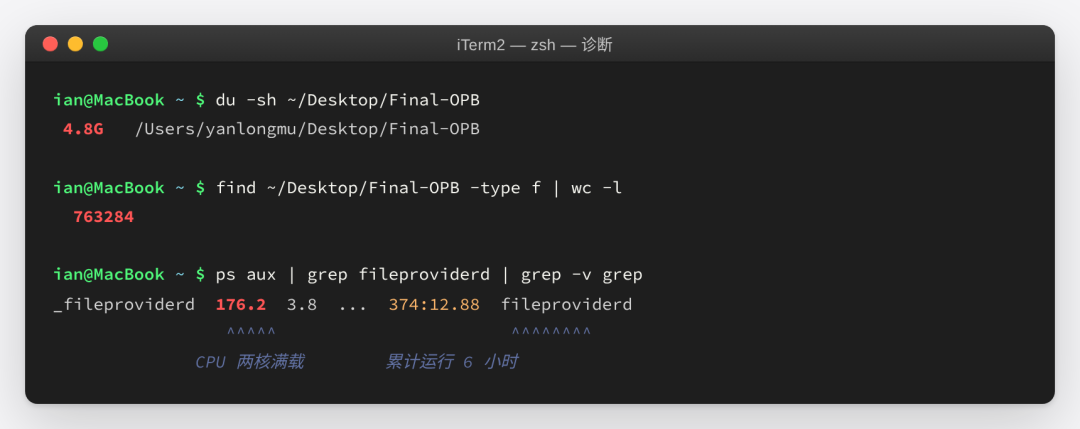
First line normal, bottom three lines are death metrics
fileproviderd is the macOS daemon that manages iCloud sync. It was eating two full CPU cores on my machine, running continuously for 6 hours straight.
Why so busy? I ran brctl status (Apple's official iCloud status tool):
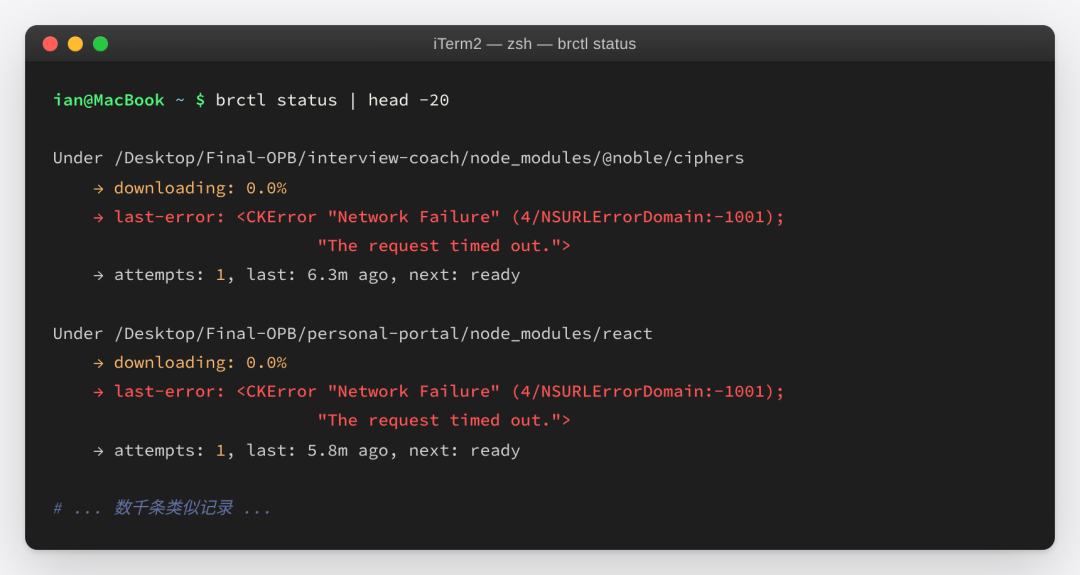
iCloud was repeatedly trying to download tiny files from node_modules, timing out every time
iCloud was stuck in a loop trying to download my project's node_modules. Failing every time. Retrying every time.
For 6 hours straight.
Three Poisoned Thorns of Truth
Thorn 1: Code Stored in Desktop
macOS has a very "helpful" default feature — Desktop & Documents Folders sync. Once enabled, everything in ~/Desktop/ and ~/Documents/ automatically syncs to iCloud.
My main working directory ~/Desktop/Final-OPB/ contained 5.3 GB of data, 760,000 files, 16 sub-projects. All sitting in the iCloud sync pool.
Thorn 2: node_modules Became iCloud's Executioner
Ran a quick command. Result: 576 node_modules directories. Each containing thousands to tens of thousands of small files, totaling roughly 220,000 npm package files — all being treated by iCloud as "user documents" that needed syncing.
Industry iron law: node_modules must NEVER be synced. Reproducible (npm install recreates it), massive in quantity, frequently written.
Thorn 3: Proxy Software Hijacked iCloud
Ran another command:
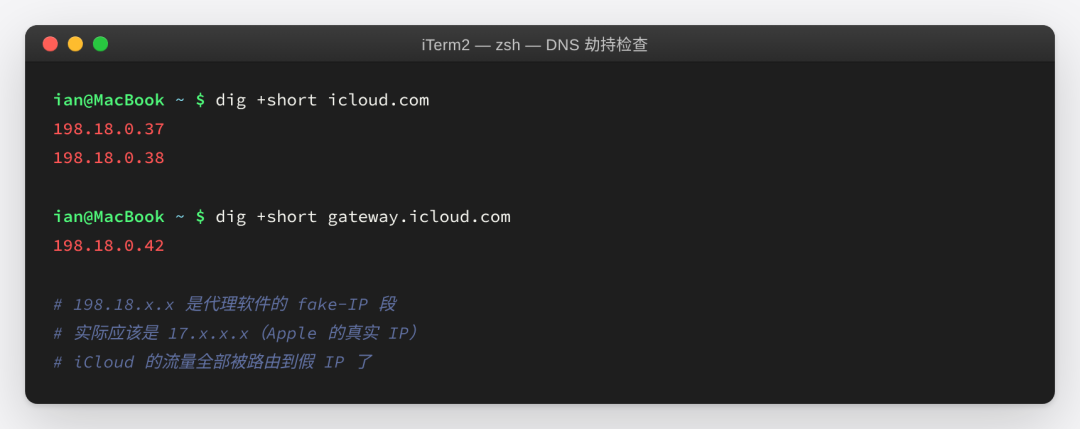
DNS hijacked to the 198.18.x.x fake-IP range
Seeing 198.18.x.x my heart sank — this is a proxy's fake-IP range. The proxy on my machine was routing iCloud traffic to fake IPs. iCloud couldn't reach Apple's actual servers at all.
Three Thorns Stacked

A single causal chain dragging the machine to death
My normal coding workflow had become a battle with fileproviderd for CPU.
Day 1: An Afternoon Falling Into the Abyss
17:30 · Detected Anomaly
First time feeling the lag. Restarting Claude Code had no effect. Started suspecting the system.
18:00 · First Diagnosis
Discovered fileproviderd eating CPU. Found a hook script that ran git add -A && git commit in a 760,000-file git repo after every Write. Disabled it. No effect — not the root cause.
19:30 · Attempted Migration
Tried moving the project from Desktop to Code:
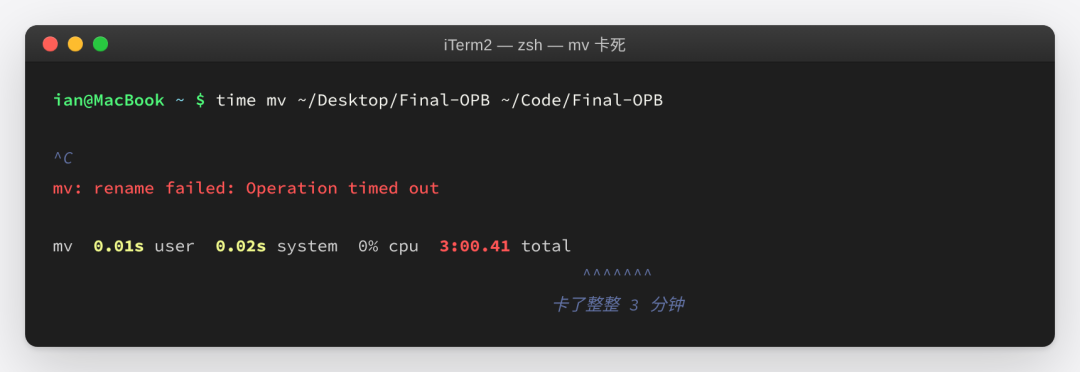
mv simply wouldn't budge
21:00 · My Biggest Mistake
I naively assumed: pause the fileproviderd process and mv should work, right?
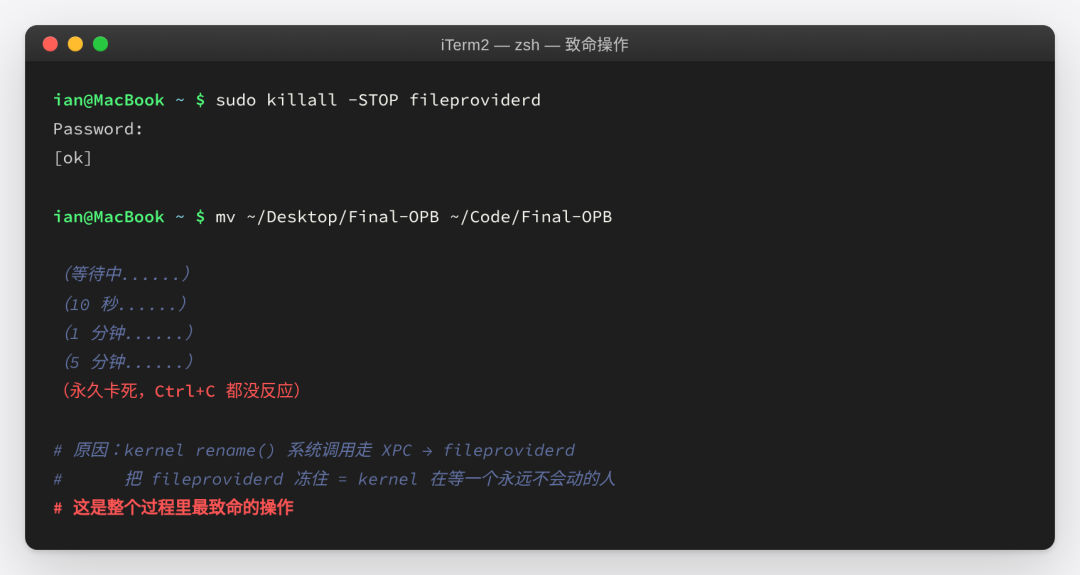
mv went from timeout to permanent deadlock
Only learned the reason afterward: the kernel's rename() system call must wait for fileproviderd's response via XPC. Freezing fileproviderd meant the kernel was waiting on someone who would never respond.
This was the single most fatal operation in the entire ordeal.
21:30 · Cleaning node_modules
Since I couldn't move it, at least reduce the "cargo" in iCloud's queue. Kept 3 active projects, deleted the other 122:
Deleted 20 largest: 16 seconds
Deleted remaining 102 smaller ones: 1 second
Total removed: 225,916 files from the iCloud queue
fileproviderd CPU dropped from 180% to 87%
First glimpse of victory.
23:00 · Tried mv Again, Still Stuck
Theoretically the smaller queue should help. Tried again — 180-second timeout, killed it. Large directory rename itself was deadlocked by FileProvider, barely related to file count.
Day 1 Summary
Time spent: ~6 hours
Achievement: Deleted 220,000 files, but core objective unmet
Mood: Meltdown, cursed AI several times
Bonus: Wrote two SOS execution manuals in case I had a meltdown the next day
Day 2: Apple Store + Ethernet + Downloading 15GB
Morning · Safe Mode Failed
Apple Silicon Safe Mode: shut down → hold power button → press Shift + Continue in Safe Mode.
Online sources claimed fileproviderd would drop to 0.2% in Safe Mode.
Reality: dropped to 161.7%. Almost no difference from normal mode. Safe Mode is ineffective against an already corrupted queue.
Afternoon · To the Apple Store
The root problem: proxy hijacked DNS, iCloud couldn't reach real servers. Even with proxy disabled, home network might not directly connect to Apple's China region cloud (iCloud 由云上贵州运营).
My final decision: go to the Apple Store.
Use their enterprise-grade network (direct Apple infrastructure connection)
Plug in ethernet (eliminate WiFi instability)
Let iCloud actually, truly download all files
This step can't be fast-forwarded. Just patient waiting.
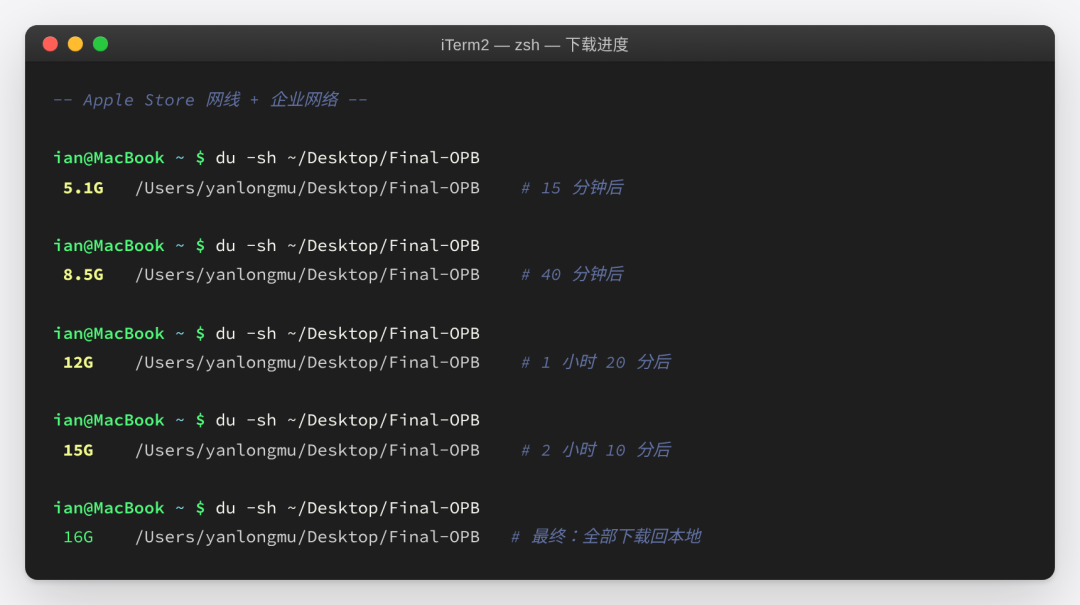
2 hours, from 5.1 GB to 16 GB, fully downloaded locally
Using cp Instead of mv
Used cp -a to copy the complete Final-OPB from Desktop to ~/Code/. On Apple Store's network, without fileproviderd interference, completed normally.
Why cp not mv: cp copies — if it fails, the original remains intact. mv moves — if it fails mid-way, both sides are corrupted. This is my most expensive lesson from this ordeal.
Day 2 Summary
Time spent: 8-10 hours
Achievement: All files returned from cloud to local, complete copy landed in
~/Code/Mood: Turning point in the darkest hour
Day 3: Cleanup, More Complex Than Expected
20:00 · Verifying cp Integrity
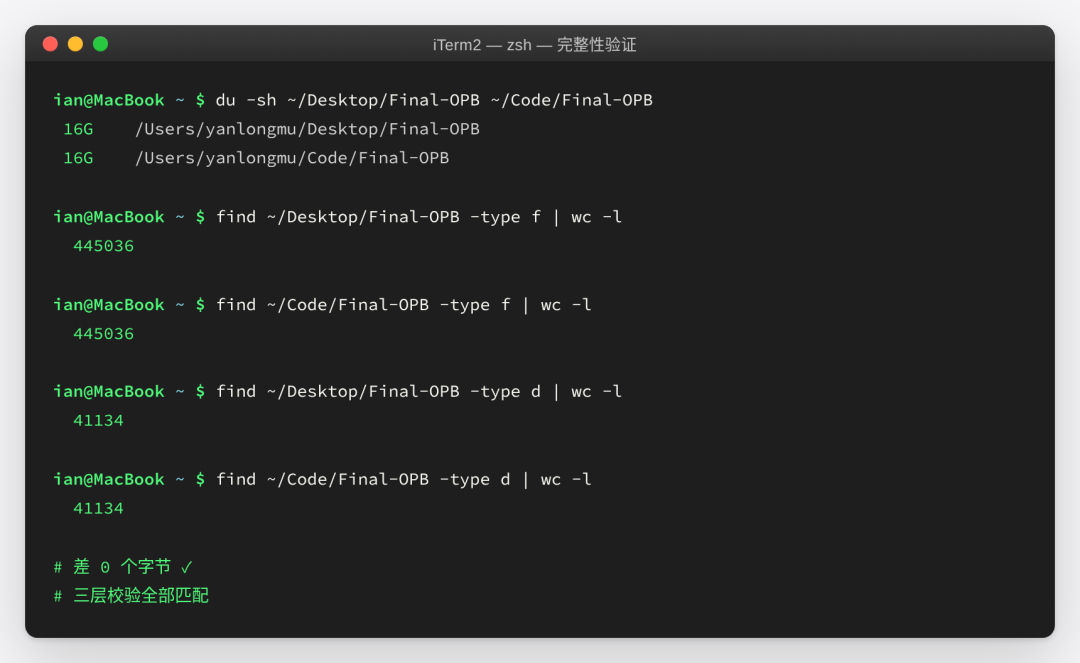
0-byte difference, all three validation layers matched
But couldn't celebrate yet. Four unexpected pitfalls ahead.
Pitfall 1: Claude Code Couldn't See Old History
Claude Code stores conversation history by project path. Claude Code launched from the new path couldn't see old history — 78 sessions remained in the Desktop-associated directory.
Solution: Used cp -rn to sync old sessions to new path. All 78 jsonl + 107 memory files followed.
Pitfall 2: cwd Fields in jsonl Still Pointed to Old Path
/resume filters by the cwd recorded in sessions. All old sessions had cwd still pointing to Desktop.
Solution: Used sed to batch-replace cwd fields, only changing cwd, not conversation content. Backed up each jsonl as .orig.
Pitfall 3: sed Changed mtime, Sorting Broke
sed updates file mtime, making all sessions appear "4 minutes ago". /resume's time-based sorting degraded to alphabetical filename order, pushing the 377 MB large session out of top 50.
Solution: Used touch -r to restore original mtime to new files. Sorting immediately recovered.
Pitfall 4: 2185 Files Hardcoded Desktop Path
The biggest pitfall. 2185 files in the project hardcoded /Users/yanlongmu/Desktop/Final-OPB:
1643
.pyc→ no need to change (rebuild handles it)258
.map→ no need to change (build artifacts)70
.md→ no need to change (historical records)About 100 .py / .sh / .json / .ts / .yaml → must change
Batch replacement used sed -i.bak, preserving 104 .bak backup files. Zero residue, every change has a rollback point.
Day 3 Summary
Time spent: 2.5 hours
Achievement: System fully operational, hardcoded paths zeroed, session history fully restored
7 Blood-Earned Lessons
1 · Never Store Code Projects in ~/Desktop/ or ~/Documents/
If you've enabled iCloud "Desktop & Documents" sync, modern dev projects with tens of thousands of files will turn iCloud into a bottomless pit.
Correct approach: Create a Code/ or Projects/ directory under ~/. These aren't synced by macOS by default.
2 · node_modules Must Never Be Cloud-Synced
iCloud / Dropbox / OneDrive — none of them. If you must keep it in a synced directory, use .nosync suffix + symlink:
mv node_modules node_modules.nosync
ln -s node_modules.nosync node_modules
3 · Proxy Software Must Whitelist Apple Domains
Otherwise, once you enable iCloud, traffic gets hijacked to fake-IPs, and fileproviderd will retry until it drags your machine to death.
Domains that need direct connection: *.icloud.com, *.icloud-content.com, *.apple.com, *.mzstatic.com, gateway.icloud.com, setup.icloud.com.
4 · Never kill -STOP fileproviderd
macOS FileProvider is a three-layer architecture: kernel → XPC → fileproviderd. Freezing fileproviderd means kernel's rename/unlink system calls never get responses — worse than hanging.
If you must kill, use -9 (launchd will respawn it). Better yet, don't touch it at all.
5 · Safe Mode Isn't a Silver Bullet for iCloud Deadlocks
Many online articles claim fileproviderd drops to 0.2% in Safe Mode. Real test: if the queue is already corrupted, Safe Mode won't save you. Large directory rename still hangs.
6 · Network Is iCloud's True Fate
If you're in mainland China, iCloud goes through 云上贵州. Any proxy/VPN can break it completely. Two viable paths:
Proxy whitelist (preferred)
Go to Apple Store and use their network when problems arise (nuclear option)
7 · Before Any Risky Operation, Ask: If This Fails, Where Can I Return To
I didn't lose data this time — not luck, but habit:
Used
cpnotmv→ Desktop original always intactsed with
-i.bak→ every modification has backupsession history with
cp -rn→ doesn't overwrite new onesVerified integrity (file count, directory count, byte count three-layer diff) before declaring success
Triple insurance principle: Any operation must have an answer to "if this fails, where can I return to."
Time Invoice
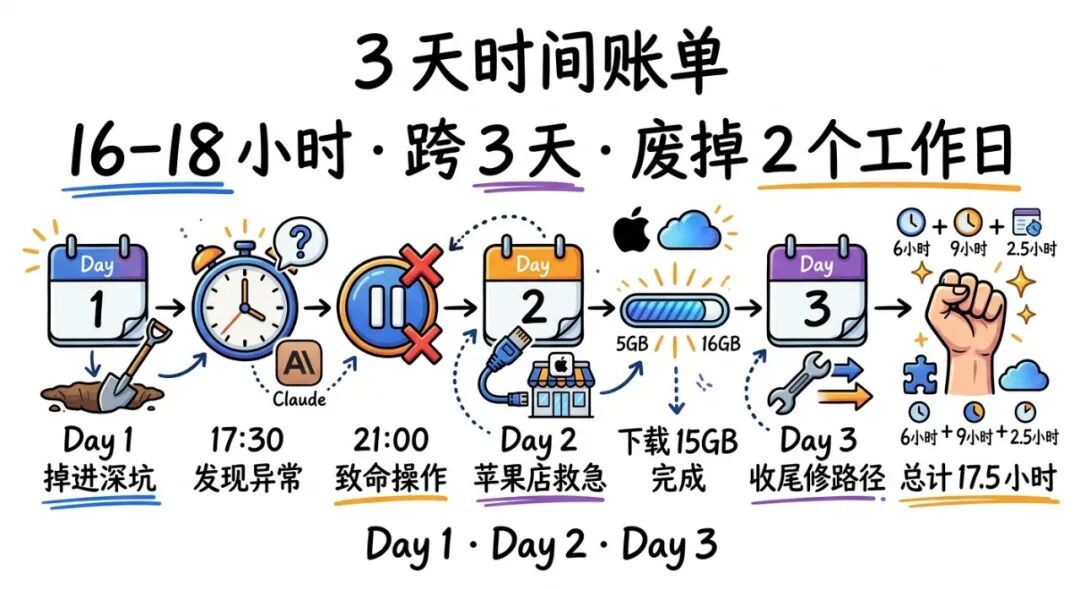
16-18 hours · Spanning 3 days · Wasted 2 work days
TimeContentDurationDay 1 (4/17)Discovery + diagnosis + failed attempts + delete node_modules~6 hoursDay 2 (4/18)Safe Mode + Apple Store + ethernet download 15GB~8-10 hoursDay 3 (4/19)cp verification + session migration + hardcoded path fixes~2.5 hoursTotal~16-18 hours
Spanning 3 days, wasting 2 work days. The launch window for "going live with personal website today" was swallowed by this disaster. Fortunately as a one-person company there's no client pushing deadlines — only myself.
If you only take away one sentence:
Move your code projects out of iCloud-managed directories (Desktop / Documents) into ~/Code/.
If you've already put them there, move them today.
Toolbox · Life-Saving Commands Used This Time
brctl status— check iCloud sync statusps aux | grep fileproviderd— check daemon CPU usagedig +short icloud.com— check if DNS is hijacked by proxy (17.x.x.x = OK, 198.18.x.x = hijacked)brctl download ~/path— force iCloud to download a directoryfind . -type d -name node_modules -prune | wc -l— count how many node_modules in projectsed -i.bak 's|old_path|new_path|g'— batch change paths (with .bak backup)
Conclusion
I used to think iCloud as a cloud service was something you should just enable by default — always beneficial.
Now I know, one "well-intentioned" default setting can render a professional developer unable to work for 3 consecutive days.
Platform default value design determines how many ordinary users will step on landmines in unexpected corners.
Hope this article helps you.
If you've already put projects in Desktop — move them today.
April 19, 2026, at ~/Code/Final-OPB/ (finally)